Modern data operations call for more than just lightning-fast queries and scalable storage. Safety, reproducibility, and control are all key parts of the equation.
As Iceberg becomes the foundation for analytical and AI-driven applications, how you handle changes to your tables will determine whether your data platform is resilient or unstable.
Iceberg branching is a mechanism that lets you isolate, test, and promote data changes with the same rigor that software teams use for code. Instead of publishing directly to production tables and praying nothing goes wrong, team members can work in controlled branches, validate results, and publish only what has been confirmed correct. This converts data pipelines from risky, one-way operations to reliable, auditable procedures.
But branching isn’t always enough. To unlock the full value of Iceberg versioning, you need to implement best practices to prevent production corruption, enable safe experimentation, and ensure atomic, reliable data releases.
Let’s start with the foundation
What Is Iceberg Branching?
Iceberg branching allows you to generate isolated, versioned versions of your data so that changes can be made, tested, and validated without affecting production. Instead of editing tables directly, you operate within a branch, which represents a distinct state of your data, replete with snapshots and metadata.
This introduces software-style version control into data operations, allowing teams to experiment safely, reproduce results, and promote only approved changes. Iceberg branching transforms data management from a brittle, overwrite-driven process to a managed lifecycle in which every change is intentional, auditable, and reversible.
Iceberg Branching vs Other Data Versioning Approaches
Iceberg branching acts at the metadata and snapshot levels rather than duplicating data. Many data versioning solutions rely on file copying, creating separate environments, or parallel dataset management. This quickly becomes costly, inefficient, and operationally complicated. Instead, iceberg branching generates lightweight references to table states, allowing for fast, cheap, and immediate branches while maintaining full isolation.
Iceberg branching is logical and atomic, unlike file-based versioning, which uses physical copies of data. To test a change, you don’t duplicate terabytes of storage; instead, you create a new branch that points to a new snapshot graph. This provides version control semantics without a storage explosion.
Compared to environment cloning (dev, staging, and production), Iceberg branching is more precise and scalable. Traditional ecosystems are coarse-grained and difficult to coordinate. Iceberg branches are finely textured, repeatable, and disposable. You can create a branch for each pipeline run, feature experiment, or release candidates without requiring additional infrastructure.
Branching provides more workflow control than table-level snapshots alone. Snapshots allow you to travel across time, while branches enable you to control change. A snapshot depicts what occurred. A branch describes where development takes place and how outcomes can be safely promoted.
And unlike external data versioning techniques that operate outside the table format, Iceberg branching is native. It understands table structure, schema evolution, partitioning, and metadata, making it more secure and dependable than generic object storage versioning.
That is why Iceberg branching is more than just a version control tool. It’s a data operations model that embeds software engineering principles at the heart of your data platform.
Table-Level vs Catalog-Level Iceberg Branching
Table-level branching isolates change within a single Iceberg table, whereas catalog-level branching isolates multiple tables at once. Native Iceberg branching operates at the table level, meaning each branch applies to a single Iceberg table and its snapshot history. Systems such as lakeFS extend branching to the repository level, enabling coordinated changes across multiple tables, files, and data assets stored in object storage. This allows teams to manage full data releases rather than isolated table updates. The former is exact and granular, whereas the latter is systemic and holistic. They determine whether you’re supervising a single dataset or an entire data release.
Iceberg’s Native Table-Level Branching
Iceberg’s inbuilt branching lets you build independent lines of development for a table by leveraging snapshots and metadata references. It’s great for testing transformations, confirming schema changes, and experimenting with optimization strategies without affecting production data. Lightweight and fast, it integrates version-control semantics directly into the table structure.
Catalog-Level, Multi-Table Branching With lakeFS Iceberg REST Catalog
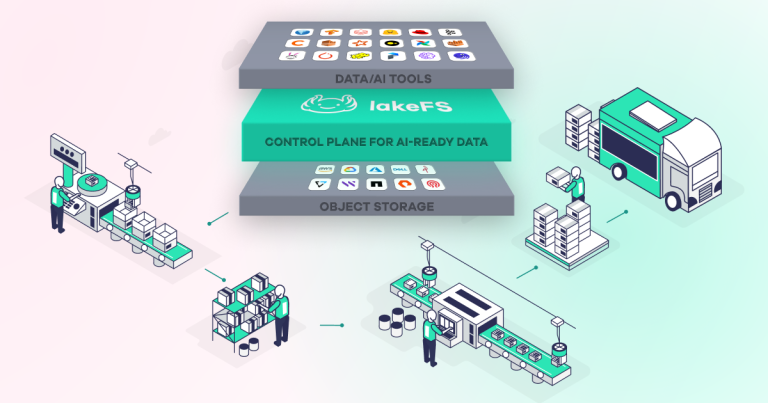
lakeFS is the control plane for AI-ready data, bridging the infrastructure gap that slows down enterprise AI initiatives. Built on a highly scalable data version control architecture, it brings Git-like semantics to large-scale data. Branching is available for the full lakeFS Iceberg REST Catalog, rather than just individual tables.
You can create separate branches spanning multiple Iceberg tables and their underlying data, enabling coordinated modifications across large pipelines. This transforms branching into a release management tool for data platforms, rather than just a table function.
Apache Iceberg itself provides table-level branching, but it does not coordinate changes across multiple tables. The lakeFS Iceberg REST Catalog enables this capability by routing Iceberg table operations through lakeFS branches, allowing teams to manage multi-table changes as a single versioned release.
When Should You Use Table Branches versus Catalog Branches
Use table branches for changes that are local, experimental, or limited to a particular dataset. Catalog branches are used when modifications affect several tables, pipelines, or data products and must be distributed simultaneously. Table branches improve development speed, while catalog branches maintain operational correctness.
Maintaining Consistency Across Multiple-Table Branch Operations
You can say that you’ve achieved multi-table consistency when all connected tables, files, and metadata evolve simultaneously within a single branch. Catalog-level branching ensures atomic promotion: either all changes are published, or none are. This prevents incomplete releases, broken dependencies, and silent data corruption in downstream systems.
Iceberg Branching Use Cases
Testing and Validating Data Changes
Iceberg branching allows teams to test data conversions, backfills, and optimizations in complete isolation from production. Engineers can test correctness, performance, and data quality on a branch that simulates actual production settings. Only once the results are verified, they can apply the change, eliminating the risk of contaminating live datasets.
Managing Staging and Production Environments
Branching creates a natural split between staging and production without duplicating infrastructure or data. Staging becomes just another branch, always consistent with production and simple to update. This eliminates drift between environments and transforms promotion to production into a straightforward, atomic merging rather than a delicate deployment procedure.
Enabling Audits and Compliance Validation
Every change to an Iceberg branch is tracked, versioned, and reproducible, resulting in a clear audit trail. Compliance teams can see exactly what data changed, when it changed, and who approved it before it was published. This means that regulatory validation is included in the data pipeline rather than being done after the fact.
Supporting Schema or Data Model Updates
Schema modifications and data model updates are among the most risky procedures in data platforms. With Iceberg branching, teams can apply and evaluate upgrades independently, including downstream compatibility testing. Once proven safe, the full change set is promoted simultaneously, resulting in smooth and predictable data evolution.
Iceberg Branching Workflow
Step 1: Creating or Switching to a Branch
The workflow begins with the creation of a new branch or moving to an existing one, which represents an isolated state of your data. This branch becomes your workspace, where all writing, updates, and experimentation are carefully isolated. It replicates manufacturing without altering it, providing a realistic and risk-free environment in which to develop modifications.
Step 2: Making and Testing Changes Safely
All data writes, transformations, schema updates, and optimizations take place on the branch. Validation, data quality checks, performance tests, and downstream compatibility tests can all be performed on real data structures. Because the branch is completely isolated, failures have no impact – allowing faster experimentation.
Step 3: Reviewing, Merging, and Rolling Back Changes
Once validated, modifications are reviewed and merged into the main branch in one atomic process at the table level. When used with a versioned catalog, multiple tables and related data assets can be promoted together as a single release. This promotes the full data state in a single step, ensuring consistency across tables and pipelines. If something goes wrong, you can always roll back and revert to the prior branch state, transforming recovery into a metadata procedure instead of a data emergency.
Features of Apache Iceberg Branching
Isolated Workspaces for Data Experiments
Apache Iceberg branching enables discrete workspaces where teams can experiment with data securely and without affecting production. Each branch represents a unique version of a table or dataset, allowing teams to test transformations, backfills, schema modifications, and optimizations under realistic settings.
This speeds up and improves the reliability of experimentation by reducing failures and increasing confidence in successful results.
Controlled Merges, Rollbacks, and Auditing
Branching provides exact control over data changes. Merges promote validated changes atomically, rollbacks restore earlier states without rewriting data, and all operations are monitored using Iceberg’s metadata.
This creates a complete audit trail of what changed, when it changed, and how it was published, transforming data operations from an ad hoc process into a controlled, reproducible one.
How to Implement Iceberg Branching
Implementing Iceberg branching is less about “turning on a feature” and more about establishing a secure release procedure for how your teams write, validate, and publish data. You can achieve that at two levels: native table branching within Iceberg and multi-table branching via a versioned catalog, such as the lakeFS Iceberg REST Catalog.
1. Determine Whether You’re Branching A Table Or The Full Release
Start by mapping your modifications to the actual scope they affect:
- Table branches work best when alterations are limited to a single dataset.
- Catalog/repository branches are suitable for changes that affect numerous tables and shared dependencies (raw files, derived tables, metadata, and configurations) – where these changes are promoted as a single release.
Here’s a basic rule you can follow: if downstream correctness is dependent on numerous tables changing in lockstep, don’t branch just one table.
2. Create A Branching Naming And Lifetime Convention
Branches become your operational infrastructure, so approach them as environments with explicit rules:
- Use predictable names, such as
dev//,rc/, andhotfix/ - Define who can create branches, who can merge, and what must happen before merging (tests, checks, approvals)
- Define retention (short-lived trial branches are automatically deleted after X days, while release branches are kept for longer)
This prevents “branch sprawl” and ensures that promotions are trustworthy.
3. Add Native Iceberg Table Branching For Isolated Table Modifications
For table-scoped work, use Iceberg’s snapshot-driven branching and tagging model:
- Create a branch from a table known to be in good condition
- Set that branch reference as the read/write destination for your compute jobs (Spark, Flink, Trino, etc.)
- Perform transformations and validations on the branch
- Promote by merging/publishing the branch reference into the main; if necessary, roll back to a previous snapshot
The key here is discipline: no direct production writing.
4. Implement Catalog-Level Multi-Table Branching With lakeFS Iceberg REST Catalog
If you require coordinated, multi-table releases, provide branching at the catalog/repository level. While native table branching manages your Iceberg datasets, catalog-level branching with lakeFS is essential if your workflow involves mutlimodal data such as images, machine learning models, or configuration files that must remain in sync with your tables. Create a lakeFS branch for an isolated “data release workspace” and use the lakeFS Iceberg REST Catalog to route Iceberg table operations through that branch.
Run your pipelines so that all affected tables and underlying objects appear in the same branch, and promote by merging the branch into main and publishing the full release atomically.
This is how to avoid incomplete releases in which table A moves forward, while table B doesn’t.
5. Set Write-Audit-Publish (WAP) As Your Default Workflow
In WAP, branching becomes operationally reliable:
- Write – All modifications are made to a branch (never to main)
- Audit – Perform automated checks on data quality, schema compatibility, row counts, invariants, query performance, and downstream tests
- Publish – Merge only after checks pass, resulting in a single, traceable release event
Treat “publish” as a deployment: intentional, reviewed, and reversible.
6. Implement Guardrails, Including Permissions, CI-Style Checks, And Observability
To prevent branching from becoming “optional” in your team, implement a bit of enforcement:
- Permission
main/prod, so only controlled merges can modify it - Automatically validate branch updates (similar to continuous integration for data)
- Record each publish/merge event, including who performed it and which commit, snapshot, or references were promoted
- Maintain post-merge health (freshness, anomaly detection, and query failures) and have rollback playbooks ready
7. Implement Rollback As A First-Class Operation
Branching is only safe when rollback becomes routine in your team. Here are a few best practices to help you nail that:
- Define what causes a rollback (failed SLA, downstream breaks, anomalies)
- Keep the previous production reference accessible and documented
- Roll back by restoring the main to the latest known-good state (metadata-first), then rerunning audits
When rollback is straightforward, teams no longer fear change, and your platform becomes more trustworthy.
Common Iceberg Branching Challenges
Merge Conflicts
Iceberg merge conflicts typically occur when two branches modify overlapping elements of the same table state, such as schema modifications, partition specification changes, or concurrent rewrites/compactions that affect the same snapshots.
The easiest way to avoid “overlap windows” is to keep branches short-lived, rebase/refresh often from the mainline, and avoid combining high-impact activities (schema evolution + rewrite + backfill) in the same branch unless necessary.
For high-risk changes, treat merges like releases: require automated validation (counts, invariants, schema compatibility) and prefer publishing via a controlled WAP route to detect conflicts before they reach production.
Concurrency
Concurrency issues arise when many tasks write to the same table or branch simultaneously, or when long-running jobs conflict with maintenance procedures (such as compaction, clustering, or expiring snapshots).
Iceberg’s commit model is useful, but operational guardrails are still required: isolate writes by branch per pipeline run or per team, serialize “table maintenance” chores, and utilize unambiguous ownership rules to ensure that only one writer manages a certain branch/table at a time.
If you simply must enable parallel writers, divide the work such that they don’t end up competing on the same logical slices, and enforce retry/backoff behavior for commit failures to prevent cascading job flapping.
Cross-Table Consistency
Table-level branching doesn’t guarantee that a collection of connected tables will move forward simultaneously; so you may wind up with partial releases in which upstream tables were updated but downstream tables were not, and vice versa.
The solution is to promote changes as a unit whenever dependencies exist: use a catalog/repository-level branch (for example, via a versioned catalog such as the lakeFS Iceberg REST Catalog) to ensure that all relevant tables, files, and metadata are on the same branch and merged atomically.
Combine this with a release checklist to ensure join compatibility, referential integrity expectations, shared dimensions, and “same-cut” freshness throughout the entire data product before publishing.
Security and Governance in Iceberg Branching
Retention Policies and Compliance Management
Iceberg branching supports auditability by making all data states explicit, versioned, and reproducible. You can apply retention policies to branches and snapshots to govern how long experimental, staging, or release data is retained, ensuring that sensitive or regulated data is not stored for longer than necessary. This is crucial for addressing legal requirements such as GDPR, HIPAA, and financial data retention guidelines.
Because branches reflect complete data states, compliance teams can determine exactly what data existed at any given time, what changed between releases, and when certain versions were published or expired. Retention is no longer a storage concern, but a governance technique.
Branch Protection
Branch protection transforms Iceberg branching from a convenience feature to a security barrier. Production branches should be locked down so they cannot be written to directly and can only be updated via controlled merge procedures. Permissions can specify who can create branches, execute audits, and publish changes.
This prevents unintentional corruption, illegal data alterations, and unreviewed releases. In practice, protected branches treat “production” as a destination rather than a workspace, ensuring that every modification that reaches it has been validated, reviewed, and approved.
Multi-Modal Data Branching With lakeFS
Modern data systems are no longer just tabular. They integrate Iceberg tables with raw files, machine learning features, models, pictures, texts, logs, and configuration artifacts. While this article focuses on Iceberg workflows, lakeFS works with Iceberg and other data formats stored in object storage. It versions the underlying data repository itself, meaning structured tables, semi-structured files, and unstructured data can all participate in the same branching and release workflows. Most data versioning solutions fail when attempting to manage change across these various data types. That’s because they only version the tables, not the entire data platform.
lakeFS addresses this issue by considering the entire data repository as a versioned system. When you build a branch, you are not only branching Iceberg tables, but everything ese:
- Semi-structured files (Parquet, JSON, and CSV)
- Unstructured data includes photos, sounds, and documents
- Machine learning artifacts and feature sets
- Metadata, configuration, and generated outputs
This is what opens the doors to multi-modal branching.
With the lakeFS Iceberg REST Catalog, Iceberg becomes a first-class citizen in this repository-level versioning framework. Iceberg table operations are resolved via lakeFS branches, so when a pipeline writes to a branch, both the Iceberg table metadata and the underlying object data is versioned alongside all other data assets.
The end result is a single, unified branch that reflects the entire data state rather than just a portion. This is particularly useful for pipelines spanning multiple modalities.
All of this can happen within a single isolated branch. You can run the entire pipeline end-to-end, knowing that every artifact it generates is in the same versioned space. When you merge a branch, you publish the full pipeline output atomically.
Instead of hoping that all components are in sync, the multi-modal branching allows you to architecturally guarantee it. Either the entire data product is correct and promoted simultaneously, or none of it is. This is the distinction between versioning datasets and versioning a whole data platform.
Using the lakeFS Iceberg REST Catalog (IRC)
Iceberg branching is implemented at the table level, but when you use a versioned catalog such as the lakeFS Iceberg REST catalog, you can elevate this concept to the catalog itself.
This allows you to create fully isolated branches spanning multiple tables, enabling you to manage and experiment with entire datasets as cohesive units rather than individual tables.
The lakeFS Iceberg REST Catalog (IRC) builds on this by integrating directly with lakeFS branches, enabling governed writes and the controlled, versioned audit and publication of Iceberg data. Each change can be tracked, validated, and promoted through environments with full reproducibility.
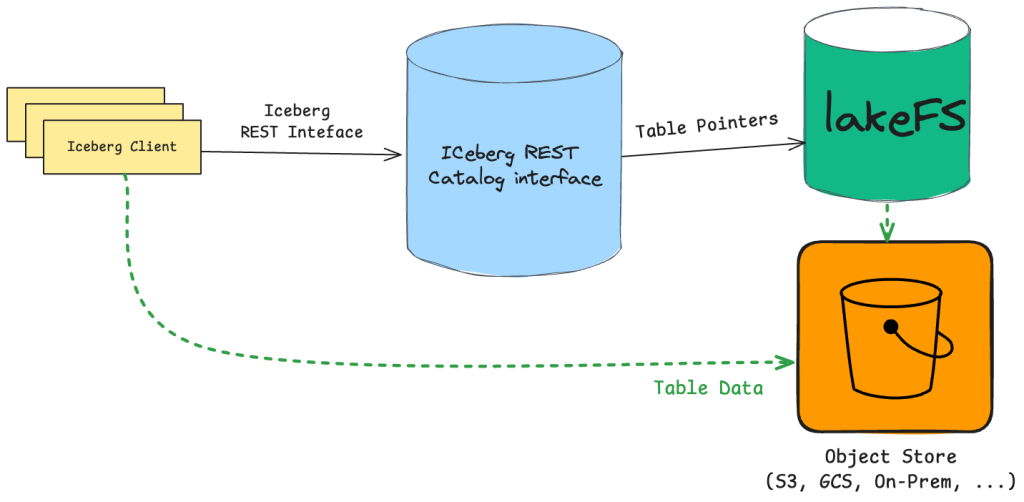
With systems like lakeFS that support multimodal data management, branching goes even further. Branches do not only represent catalog-level versions but extend to the entire data repository, spanning structured, semi-structured, and unstructured data.
This means you’re creating unified, end-to-end data branches that version both your Iceberg tables and all associated data assets together, providing true repository-level isolation and consistency.
Branching Beyond Tables: Repository-Level Data Versioning
When branching moves from the table to the repository level, you stop thinking in terms of isolated datasets and start thinking in terms of complete data states. A branch becomes a full snapshot of your data world: Iceberg tables, raw files, derived artifacts, schemas, and metadata. This enables true environment parity.
What exists on a branch is exactly what will exist in production once it is merged. No hidden dependencies, no partial versions, no manual synchronization.
Coordinating Changes Across Files, Tables, and Metadata
Real-world data pipelines rarely touch only one Iceberg table. They usually involve:
- Raw files landing in object storage
- Transformations producing Iceberg tables
- Metadata updates
- Validation artifacts
- Downstream materializations
Repository-level branches make all of these move together. You can update raw data, evolve schemas, rewrite tables, and adjust metadata in a single isolated branch. Either everything is correct and merged together, or nothing is. This guarantees atomic, consistent data releases across your entire platform.
Write-Audit-Publish (WAP) Iceberg Data
With the lakeFS Iceberg REST Catalog working on top of lakeFS branches, Write-Audit-Publish becomes natural and enforced by design:
Enforcing Write-Audit-Publish | How |
|---|---|
Write | All Iceberg writes go to a branch, never directly to production. Tables, files, and metadata are isolated and safe to experiment on. |
Audit | You validate data quality, schema correctness, performance characteristics, and downstream compatibility using that branch. Since the branch represents a full repository state, audits are realistic and production-faithful. |
Publish | A merge operation promotes the entire data state at once. Publishing becomes a controlled, atomic action instead of a series of fragile table-level updates. |
This turns Iceberg into a first-class citizen in a governed data release workflow.
Testing Multi-Modal Pipelines Using Isolated Branches
Modern data platforms are multimodal. With repository-level branching, you can test pipelines that span all of these modalities in isolation.
A single branch can contain:
- The raw input files
- The transformed Iceberg tables
- The feature sets
- The trained models
- The validation reports
This makes branches behave like ephemeral, fully reproducible data environments. You can spin up branches for each experiment, model training, pipeline change, or release candidate without duplicating storage or risking production data.
This way, branches become more than a data engineering tool – a platform-level mechanism for safe, scalable, end-to-end data development.
Conclusion
Iceberg branching introduces the software engineering discipline to data processing. It replaces dangerous, irreversible writes with tightly controlled operations based on isolation, validation, and atomic promotion.
When combined with strong governance, WAP practices, and repository-level branching via systems such as lakeFS, data releases become predictable, auditable events rather than unpredictable guesses. By using lakeFS and Apache Iceberg together, teams get speedier experimentation, safer deployments, and a data platform that can evolve with confidence rather than caution.